OOP Fundamentals
- Reading
- 19 min
- Sections
- 08
- Figures
- 10
This chapter introduces OOP, a popular programming paradigm that organizes code and data into objects. These objects interact to perform tasks and model real-world entities, providing a structured approach to building flexible, maintainable software.
Why Learn OOP?#
Understanding OOP fundamentals, including core principles such as encapsulation and advanced design guidelines like SOLID, is key to excelling in OOD interviews. OOP knowledge equips you with a clear mental model and foundational skills. It enables you to make design decisions aligned with widely accepted principles, articulate your reasoning to interviewers, and leverage established patterns to solve common problems efficiently.
OOP interviews often mirror real-world business applications and technical components. Understanding OOP concepts and SOLID guidelines not only prepares you for interviews but also makes you a stronger developer once hired. While functional programming and other paradigms are gaining traction, OOP remains the backbone of general software development. To deepen your expertise, supplement this chapter's essentials with additional resources on OOP principles.
Cornerstones of Object-Oriented Programming#
Object-oriented programming is built on four fundamental principles: Encapsulation, Abstraction, Inheritance, and Polymorphism.
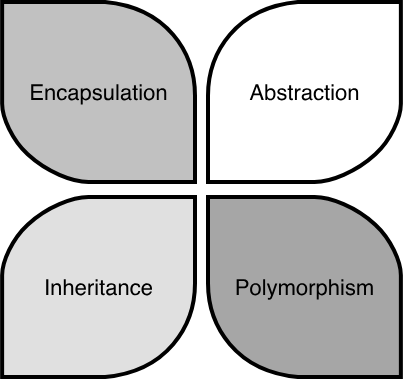
Cornerstones of OOP
These principles guide how we organize code and design software. The other techniques and design patterns stem from these principles, and they are important for evaluating solutions. Let's dive into each principle with practical examples.
Encapsulation#
Encapsulation is the concept of bundling data as attributes and logic as methods, and then putting related attributes and methods within a single unit called an object. The object's internal state is hidden from the outside world, and access to the data or state is controlled through well-defined interfaces available as public methods. A description of a type of object is a class, while a specific object is called an instance.
To see how encapsulation works in practice, let's explore the Person class, which bundles data like name and age with methods to manage them while controlling access to that data.
How to work toward encapsulation?#
To achieve encapsulation, follow these steps:
- Define your classes: Identify objects in your requirements, think about the data they hold, and the functionality they support. For the
Personclass, the data includesnameandage, and the functionality includes accessing and modifying these attributes. - Enforce encapsulation: Declare the class's data members (attributes) as
privateto restrict direct access from outside the class. Provide public methods (getters and setters) to access and modify those attributes. - Use access modifiers: The
privateaccess modifier restricts direct access to the attributes outside the class. Only methods in the class have access to these private members. Public methods are the interface through which external code interacts with the object's attributes, hiding internal implementation details and maintaining the object's integrity.
Implementing encapsulation in Java#
Let's demonstrate encapsulation in Java with a simple class representing a "Person":
public class Person {
    // Private data members (attributes)
    private String name;
    private int age;

    // Public constructor
    public Person(String name, int age) {
        this.name = name;
        this.age = age;
    }

    // Public getter methods (accessors)
    public String getName() {
        return name;
    }

    public int getAge() {
        return age;
    }

    // Public setter methods (mutators)
    public void setName(String name) {
        this.name = name;
    }

    public void setAge(int age) {
        if (age >= 0) {
            this.age = age;
        }
    }
}- The
Personclass has private attributesnameandage, which cannot be accessed directly from outside the class. - Public getter methods,
getName()andgetAge(), allow external code to read (access) the private attributes. - The setter methods,
setName()andsetAge(), are also public, allowing external code to modify (mutate) the private attributes.
This implementation ensures that the Person object's internal state is protected, and external code interacts with it only through controlled methods.
When to use encapsulation?#
Encapsulation is particularly useful in the following scenarios:
- Protecting data integrity: When you need to ensure an object's data remains consistent and valid. For example, in the
Personclass, encapsulation hidesnameandageas private attributes, allowing thesetAge()method to enforce rules like non-negative values, preventing invalid modifications, and ensuring the object's state is reliable. - Controlling access and improving security: Encapsulation restricts direct access to sensitive data. While attributes like
nameandagein aPersonclass are not highly sensitive, encapsulation becomes essential for classes handling critical information such as passwords. Although encapsulation alone does not guarantee full security, it acts as a foundational layer by limiting unwanted access. - Modularity and reusability: When designing classes that can be reused across different applications. The
Personclass's clear interface makes it modular and reusable in contexts like school management or social networking systems.
Common pitfalls#
While encapsulation is powerful, avoid these common mistakes:
- Over-encapsulation: Creating excessive getter and setter methods for every attribute can make code verbose and harder to maintain.
- Under-encapsulation: Failing to hide internal details can lead to tight coupling and reduced modularity. For instance, if
nameandagein thePersonclass were public, other parts of the code could modify them directly, leading to potential inconsistencies.
Abstraction#
Abstraction can simplify complex systems by hiding unnecessary details. It separates the "what" an object does from the "how" it does it, enabling users to interact with objects through simplified interfaces. For example, the volume button on a television remote control provides a simple way to adjust sound without exposing the TV's internal circuitry. In programming, abstraction is achieved using mechanisms like abstract classes and interfaces.
To see how abstraction works in practice, let's explore a Shape class and a Drawable interface, which define simplified behaviors for shapes like circles.
How to work toward abstraction?#
To achieve abstraction, use abstract classes and interfaces: Define abstract classes or interfaces with abstract methods, which are declared without implementation and must be implemented by subclasses. These allow users to call methods without needing to know their internal details.
Implementing Abstraction in Java#
Let's demonstrate abstraction in Java with an abstract class representing a Shape and an interface representing a Drawable object:
// Abstract class
abstract class Shape {
    protected String color;

    public Shape(String color) {
        this.color = color;
    }

    // Abstract method
    public abstract double area();

    // Concrete method
    public void displayColor() {
        System.out.println("This shape is " + color + ".");
    }
}

// Interface
interface Drawable {
    void draw();
}

// Concrete class implementing Shape and Drawable
class Circle extends Shape implements Drawable {
    private double radius;

    public Circle(String color, double radius) {
        super(color);
        this.radius = radius;
    }

    // Implementing abstract method from Shape
    @Override
    public double area() {
        return Math.PI * radius * radius;
    }

    // Implementing method from Drawable interface
    @Override
    public void draw() {
        System.out.println("Drawing a circle.");
    }
}
The implementation demonstrates abstraction through:
- The
Shapeabstract class defines an abstractarea()method that subclasses must implement and a concretedisplayColor()method, which provides a default behavior. - The
Drawableinterface, which declares adraw()method that implementing classes must define. - The
Circleclass extendsShapeand implementsDrawable, providing specific implementations forarea()(calculating the circle's area) anddraw()(describing the drawing action).
This structure allows users to interact with shapes using high-level methods like area() and draw() without needing to know the underlying drawing logic.
When to use abstraction?#
Abstraction is particularly useful in the following scenarios:
- Simplifying complex systems: Abstraction helps provide a clean and consistent interface for complex functionality. For example, in the
Shapeclass, abstraction allows users to callarea()without understanding the mathematical calculations, making the system easier to use. - Promoting code flexibility: When you anticipate that subclasses will provide specific implementations of generalized behavior, abstraction becomes essential. The
Shapeclass's abstractarea()method ensures that shapes like circles or rectangles implement their area calculations, allowing flexibility in design. - Supporting extensibility: Abstraction makes it easier to extend systems without modifying existing code. For instance, adding a new shape like
Triangleto theShapehierarchy only requires implementingarea(), without changing existing code that uses shapes.
Abstraction vs. Encapsulation#
Abstraction and encapsulation are distinct but complementary OOP principles, often confused because both involve hiding details. Here's how they differ:
| Characteristics | Abstraction | Encapsulation |
|---|---|---|
| Focus | Hiding complexity by exposing only what an object does through simplified interfaces, without revealing how it does it. | Bundling data and methods into a single unit (a class) and protecting data by restricting direct access. |
| Purpose | Simplifies user interaction and promotes flexibility by defining high-level behaviors. | Ensures data integrity and maintainability by controlling access to an object's data. |
| Implementation | Uses abstract classes and interfaces, e.g., the Shape abstract class with area() or the Drawable interface with draw(). | Uses access modifiers (e.g., private, public) and methods, e.g., private radius in Circle with public getRadius() and setRadius(). |
By understanding these differences, you can apply abstraction to simplify interfaces and encapsulation to protect data, creating robust and user-friendly systems.
Inheritance#
Inheritance allows a class (subclass or derived class) to inherit properties and behaviors from another class (superclass or base class). It promotes code reuse and creates a hierarchical relationship between classes. Think of inheritance like a family tree, where children inherit traits from their parents, and grandchildren inherit traits from both their parents and grandparents. The subclass can extend and specialize the functionality of its superclass, reducing code duplication.
Common patterns of class hierarchy#
Building on the concept of inheritance, we now explore common patterns for structuring class hierarchies in Java.
Single inheritance#
A subclass extends only one superclass. This is the standard type of inheritance supported in Java. Below is an example of single inheritance.
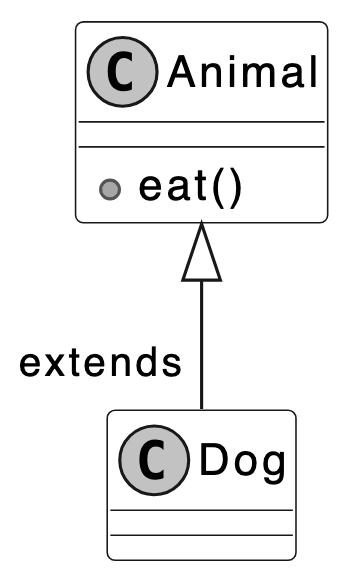
Single inheritance
In the above example, we demonstrate single inheritance by creating a Dog class that extends the Animal class. The Dog class inherits the eat() method from Animal.
Multilevel Inheritance#
A subclass that inherits from another subclass, creating a chain of inheritance, is called multilevel inheritance. Consider a scenario with three classes: Animal, Mammal, and Dog, where Animal is the superclass of Mammal, and Mammal is the superclass of Dog.
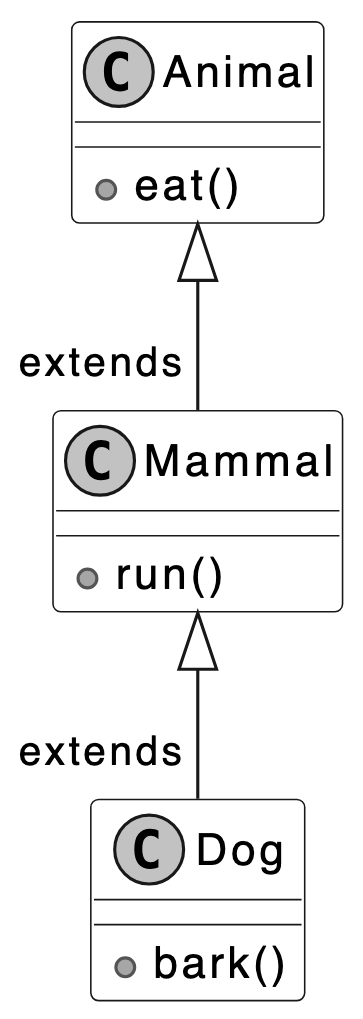
Multilevel inheritance
In the above example, the Dog class inherits behavior from the Animal and Mammal classes. Multilevel inheritance is useful when you have classes that exhibit a hierarchical relationship, with each subclass specializing and adding new behavior to the existing hierarchy.
Hierarchical Inheritance#
In hierarchical inheritance, multiple subclasses inherit from the same superclass, forming a hierarchical structure. In the example below, you can see two subclasses, Car and Motorcycle, both inherit from the Vehicle class, forming a hierarchical inheritance relationship.
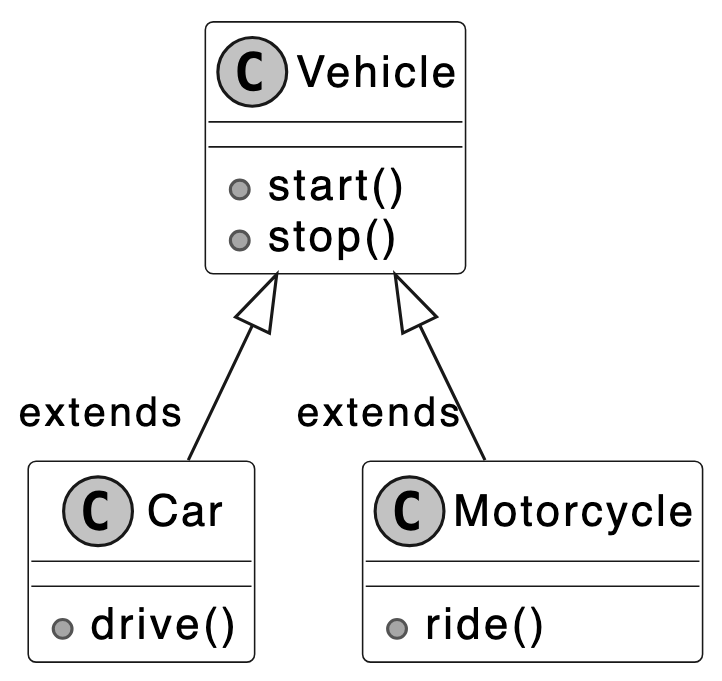
Hierarchical inheritance
Hierarchical inheritance is beneficial when multiple classes share common attributes or behaviors from a single superclass.
When to use inheritance?#
Inheritance is particularly useful in the following scenarios:
- Whenever we encounter an 'is-a' relationship between objects, we can use inheritance.
- When multiple classes share common attributes or methods, a superclass can define them once, allowing all subclasses to inherit them and avoid duplication.
- When classes form a natural hierarchy, such as
Animalbeing a parent toDogandCat, inheritance organizes the structure clearly.
Drawbacks of inheritance#
While Inheritance promotes code reuse, its overuse can complicate designs. Here are the key drawbacks to consider:
- Tight coupling: Subclasses depend heavily on their superclass. Changes to the superclass, such as modifying the
Animalclass'seat()method, can break subclasses likeDogorCat, making the code harder to maintain. - Inappropriate behavior inheritance: Inheritance can force subclasses to inherit behaviors that don't apply. For example, adding a
fly()method to theAnimalsuperclass assumes all subclasses (e.g.,Penguin) can fly, leading to errors or awkward workarounds like throwing exceptions. - Limited flexibility: Inheritance locks in relationships at design time. If you later need a
RobotDogthat barks but doesn't eat, it can't inherit fromAnimalwithout inheriting irrelevant methods.
To address these issues, consider alternatives like composition (combining objects) or interfaces, which offer flexibility and loose coupling.
Inheritance vs. Composition#
Given inheritance's limitations, it's helpful to compare it with composition, another way to structure classes. Inheritance creates an "is-a" relationship, where a subclass is a type of its superclass (e.g., Dog is an Animal). Composition creates a "has-a" relationship, where a class contains other objects to provide its behavior, such as installing apps on a phone for specific tasks.
Consider the Dog and RobotDog scenario. Using inheritance, RobotDog extends Animal to inherit bark(), but it also gets eat(), which doesn't apply, causing issues like exceptions. Using composition, you define a BarkBehavior interface with a bark() method. Dog and RobotDog each have a BarkBehavior object, implemented differently (e.g., DogBark for "Woof!" and RobotBark for "Beep!"). This lets RobotDog bark without inheriting eat().
Here's a simple composition example in Java:
interface BarkBehavior {
    void bark();
}

class DogBark implements BarkBehavior {
    public void bark() {
        System.out.println("Woof!");
    }
}

class RobotBark implements BarkBehavior {
    public void bark() {
        System.out.println("Beep!");
    }
}

class Dog {
    private BarkBehavior barkBehavior;

    public Dog(BarkBehavior barkBehavior) {
        this.barkBehavior = barkBehavior;
    }

    public void bark() {
        barkBehavior.bark();
    }
}

class RobotDog {
    private BarkBehavior barkBehavior;

    public RobotDog(BarkBehavior barkBehavior) {
        this.barkBehavior = barkBehavior;
    }

    public void bark() {
        barkBehavior.bark();
    }
}

public class Main {
    public static void main(String[] args) {
        Dog dog = new Dog(new DogBark());
        RobotDog robotDog = new RobotDog(new RobotBark());
        dog.bark();      // Output: Woof!
        robotDog.bark(); // Output: Beep!
    }
}
When to use composition?#
To choose between inheritance and composition, follow these guidelines:
- Design Choice: Use inheritance for clear "is-a" relationships with stable, shared behaviors. Choose composition for "has-a" relationships or when you need flexible, swappable behaviors, as it's easier to modify and maintain.
- Interview Strategy: In OOD interviews, favor composition when flexibility or loose coupling is key, as it's preferred in modern design. For example, explain how
RobotDogusesBarkBehaviorto avoid inheritance's tight coupling. Highlight inheritance's use for simple hierarchies, but note its drawbacks.
These insights will help you design robust systems and justify your choices in interviews. With this comparison in mind, let's explore how Polymorphism builds on these ideas to create flexible behaviors.
Polymorphism#
Polymorphism is the concept of implementing objects that can take on multiple forms or behave differently depending on their context, all within a common interface. It provides the flexibility to add new behaviors without modifying existing code.
Consider a media player as a real-world example. Different types of media, such as audio, video, and streaming content, would be played on the same rendering widget and controlled by the same "play" button. But they require different internal processing and rendering logic. The user only interacts with a uniform interface, while polymorphic behavior manages the varying objects.
Types of Polymorphism#
Polymorphism in object-oriented programming is typically categorized into two main types: compile-time (static) and runtime (dynamic) polymorphism.
Compile-Time polymorphism via method overloading#
Method overloading allows a class to have multiple methods with the same name but different parameters. The compiler determines the appropriate method to call based on the number and type of arguments passed during compile time. Method overloading enhances code readability by using the same method name for similar operations with different parameters.
Here's an example of method overloading in Java:
class MathOperations {
    public int add(int a, int b) {
        return a + b;
    }

    public double add(double a, double b) {
        return a + b;
    }

    public String add(String str1, String str2) {
        return str1 + str2;
    }
}

public class Main {
    public static void main(String[] args) {
        MathOperations math = new MathOperations();

        int sum1 = math.add(5, 10);
        double sum2 = math.add(3.5, 7.2);
        String result = math.add("Hello, ", "World!");

        System.out.println("Sum of integers: " + sum1);
        System.out.println("Sum of doubles: " + sum2);
        System.out.println("Concatenated string: " + result);
    }
}
In this example:
- The
MathOperationsclass defines multipleaddmethods with different parameter types or counts. - The compiler selects the appropriate
addmethod based on the arguments passed, enhancing code readability by using a single method name for related operations.
Runtime polymorphism via method overriding#
Method overriding occurs when a subclass provides a specific implementation for a method already defined in its superclass. The method to be executed is determined at runtime based on the actual type of the object, not the reference type. This is often referred to as dynamic dispatch, a hallmark of runtime polymorphism.
Here's an example of method overriding in Java:
class Animal {
    public void sound() {
        System.out.println("Animal makes a sound.");
    }
}

class Dog extends Animal {
    @Override
    public void sound() {
        System.out.println("Dog barks: Woof!");
    }
}

class Cat extends Animal {
    @Override
    public void sound() {
        System.out.println("Cat meows: Meow!");
    }
}

public class Main {
    public static void main(String[] args) {
        Animal animal1 = new Dog();
        Animal animal2 = new Cat();

        animal1.sound(); // Dog's sound() method is called
        animal2.sound(); // Cat's sound() method is called
    }
}
In this example:
- The
Animalclass defines a genericsoundmethod. - The
DogandCatsubclasses overridesoundto provide specific implementations. - At runtime, the JVM determines the actual type of the object (
DogorCat) and calls the appropriatesoundmethod, even though the reference type isAnimal. - The loop demonstrates polymorphic behavior by treating different objects uniformly through the
Animaltype.
When to use polymorphism?#
Polymorphism is particularly valuable in the following scenarios:
- Shared Interface: When multiple classes need to perform the same action in different ways, such as a
playmethod for various media types (e.g., audio, video). Interfaces or superclasses ensure a consistent contract across implementations. - Extensibility: When designing systems that need to accommodate new classes without modifying existing code. For example, adding a new media type to a player only requires implementing the existing
playinterface, preserving system stability. - Customization: When subclasses need to tailor the behavior of inherited methods. For instance, a
Dogbarking differently from aCatuses method overriding to provide specific implementations while adhering to theAnimalinterface.
SOLID Principle of Good Design#
Aside from the core OOP principles (encapsulation, abstraction, inheritance, and polymorphism), you should also be familiar with the SOLID principles. SOLID offers guidelines to create software that is easy to understand, modify, and extend. These principles are particularly valuable in OOD interviews, where articulating design decisions and their rationale can help you stand out.
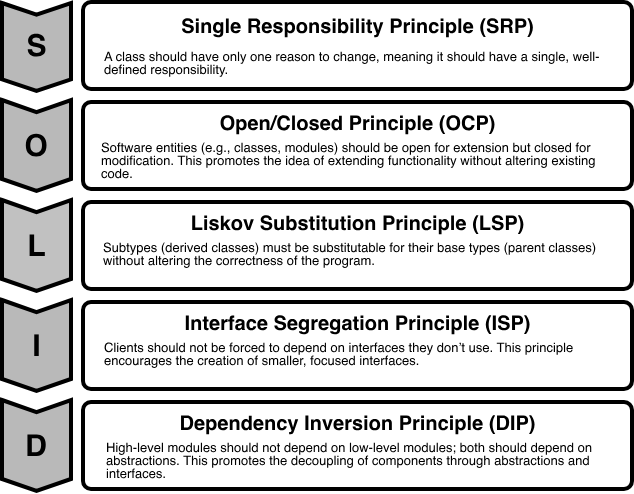
SOLID Principles
This section explores each principle through practical examples.
Single Responsibility Principle (SRP)#
The "S" in the SOLID principles stands for the Single Responsibility Principle (SRP), which states that a class should have only one reason to change or, in other words, it should have a single, well-defined responsibility or task within a software system.
Violation of SRP#
Here's an example of a class that violates SRP by taking on multiple responsibilities:
class Employee {
    private String name;
    private double salary;

    public Employee(String name, double salary) {
        this.name = name;
        this.salary = salary;
    }

    public double calculateSalary() {
        return salary * 12; // Annual salary
    }

    public void generatePayrollReport() {
        System.out.println("Payroll Report for " + name + ": $" + salary * 12);
    }
}
The Employee class above violates SRP because it has two responsibilities: calculating an employee's salary and generating a payroll report. This means the class could change for two unrelated reasons, i.e., updates to salary logic or changes to report formatting, making it harder to maintain.
Fixing the violation#
To address the violation, let's refactor the code to separate concerns and ensure that each class has a single, well-defined responsibility. We'll create distinct classes for calculating an employee's salary and generating a payroll report:
- The
Employeeclass manages employee data, such as name and salary, and calculates the annual salary based on the monthly salary. - The
PayrollReportGeneratorclass takes an employee's data and produces payroll reports.
This separation ensures that each class has a single task, and changes to salary calculations won't affect reporting, and updates to report formats won't impact employee data, making the system easier to maintain.
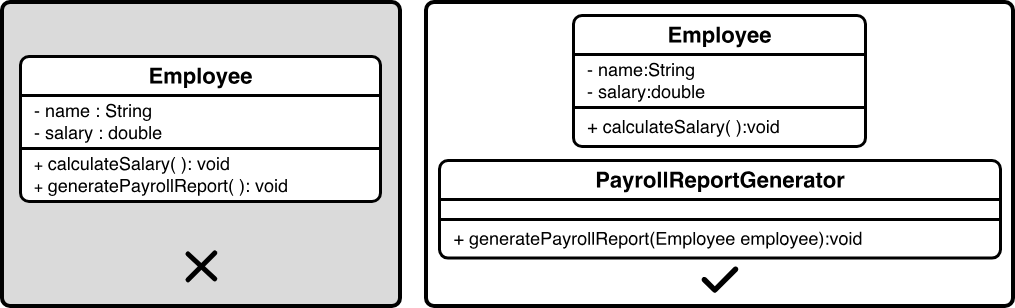
Single Responsibility Principle (SRP)
Best practices#
To adhere to the SRP effectively, consider the following guidelines:
- Aim to define a clear role for each class, focusing on one specific task.
- If a class handles multiple tasks, refactor it into smaller, focused classes with single responsibilities.
- Design classes so that changes to one task don't impact others.
Open/Closed Principle (OCP)#
The Open/Closed Principle (OCP) states that software entities, such as classes, should be open for extension but closed for modification. This means you can add new functionality without altering existing code.
Violation of OCP#
Here's an example of a class that violates OCP by requiring changes to support new shapes:
class Rectangle {
    private double width;
    private double height;

    public Rectangle(double width, double height) {
        this.width = width;
        this.height = height;
    }

    public double calculateArea() {
        return width * height;
    }
}

class AreaCalculator {
    public double calculateArea(Rectangle rectangle) {
        return rectangle.calculateArea();
    }
}
In the above example, the AreaCalculator class works only with Rectangle objects. Adding support for new shapes, like circles or triangles, would require modifying its code. This makes the system harder to maintain and prone to errors, as each new shape requires altering the core logic.
Fixing the violation#
We can refactor this design to support new shapes without changes by introducing an abstract Shape class that defines a common behavior for all shapes: calculating their area. Specific shapes, like Rectangle and Circle, inherit from Shape and provide their area calculations. This design allows new shapes, such as triangles, to be added by creating new classes that inherit from Shape, without modifying AreaCalculator or existing shape classes.
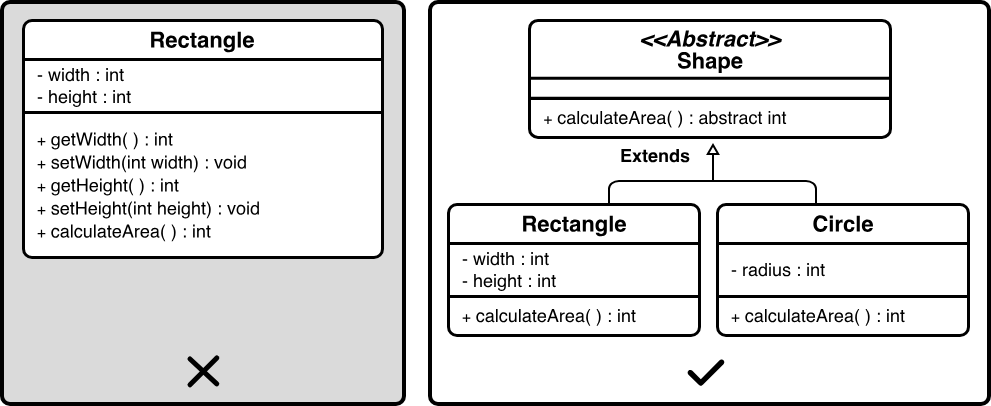
Open/Closed Principle (OCP)
Best practices#
With this extensible design in place, here are guidelines to ensure OCP compliance:
- Consider introducing abstract classes or interfaces to create flexible blueprints that classes can extend with new functionality.
- Allow subclasses to override methods to provide specific behaviors, such as unique area calculations for different shapes.
- Use polymorphism to treat objects of different classes, like various shapes, uniformly through a common interface or base class.
Liskov Substitution Principle (LSP)#
The Liskov Substitution Principle (LSP) states that objects of a derived class should be able to replace objects of the base class without affecting the correctness of the program. In other words, if class A is a subtype of class B, then instances of class B should be replaceable with instances of class A without causing issues.
Violation of LSP#
Here's an example of a design that violates LSP by assuming all birds can fly:
class Bird {
    public void fly() {
        System.out.println("Flying in the sky.");
    }
}

class Ostrich extends Bird {
    @Override
    public void fly() {
        throw new UnsupportedOperationException("Ostriches cannot fly.");
    }
}

// Program calls bird.fly() to test bird behavior
In this code, the Ostrich class inherits from Bird but throws an exception for fly, as ostriches cannot fly. This breaks the expectation that any Bird can fly when a program tests this behavior. This violates the principle that derived classes should behave as expected when replacing their base class, making the design unreliable.
Fixing the violation#
To align with LSP, we can refactor this hierarchy to ensure substitutability:
- Instead of assuming all birds can fly, we redefine the
Birdclass as an abstract class with a more general behavior, such asmove, that all birds can perform. - The
Birdclass defines amovemethod, which each bird implements according to its abilities. For example, aSparrowmight implementmoveby describing flying in the sky, while anOstrichimplementsmoveby describing running on land. - This design ensures that any derived class, like
Ostrich, can replaceBirdseamlessly, maintaining the program's correctness.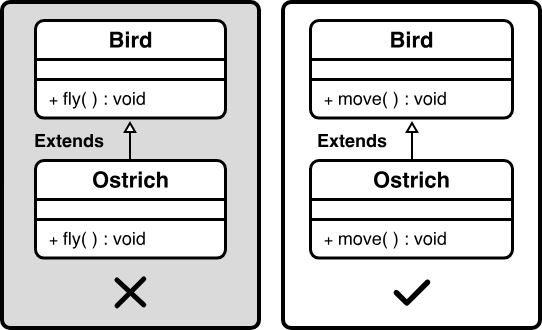
Liskov Substitution Principle (LSP)
Best practices#
With this flexible design in place, here are the guidelines to ensure LSP compliance:
- Ensure that derived classes maintain the behavioral compatibility of their base classes. Methods in derived classes should follow the same contracts as the base class methods.
- When overriding methods, derived classes must respect the base class's method contracts. Specifically:
- Preconditions: Derived class methods should require the same or weaker preconditions (e.g., input constraints) than the base class method.
- Postconditions: Derived class methods must provide the same or stronger postconditions (e.g., output guarantees) as the base class method.
- Invariants: Derived classes must maintain all invariants defined by the base class, ensuring that the object's state remains valid.
- Use polymorphism to allow derived class objects to replace base class objects, often by overriding methods to provide specialized behavior while maintaining the core functionality of the base class.
Interface Segregation Principle (ISP)#
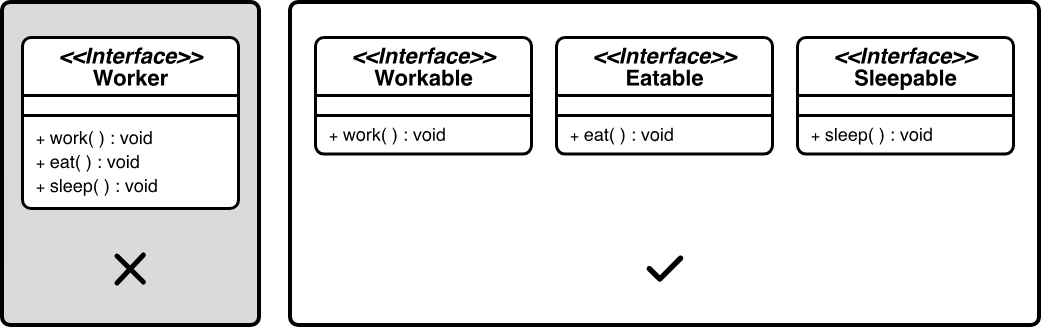
The "I" in the SOLID acronym stands for the Interface Segregation Principle (ISP), which emphasizes that clients (classes or components that use interfaces) should not be forced to depend on interfaces they don't use. In other words, an interface should have a specific and focused set of methods that are relevant to the implementing classes.
Violation of ISP#
Here's an example of a design that violates ISP by including methods that not all implementing classes need:
interface Worker {
    void work();
    void eat();
    void sleep();
}

class Robot implements Worker {
    public void work() {
        System.out.println("Performing tasks like welding.");
    }

    public void eat() {
        throw new UnsupportedOperationException("Robots don't eat.");
    }

    public void sleep() {
        throw new UnsupportedOperationException("Robots don't sleep.");
    }
}

class Human implements Worker {
    public void work() {
        System.out.println("Performing tasks like coding.");
    }

    public void eat() {
        System.out.println("Eating a meal.");
    }

    public void sleep() {
        System.out.println("Sleeping for rest.");
    }
}
In this code, the Worker interface forces Robot to implement eat and sleep, which are irrelevant, leading to unsupported operations. This makes the code harder to maintain and prone to errors, as classes must handle methods that don't apply to them.
Fixing the violation#
To align with ISP, we can refactor this interface to be more focused:
- Instead of a single
Workerinterface with unrelated methods, we split it into three smaller, tailored interfaces:Workable,Eatable, andSleepable. - The
Workableinterface includes only theworkmethod, which all workers, like robots and humans, can implement. - The
Eatableinterface includes theeatmethod, relevant to humans but not robots. - The
Sleepableinterface includes thesleepmethod, which is also specific to humans.
This design ensures classes implement only the methods they need, making the code cleaner and more maintainable.
Interface Segregation Principle (ISP)
Best Practices#
Here are guidelines to ensure ISP compliance:
- Aim to design interfaces with a specific purpose, including only methods directly related to that purpose.
- Consider creating multiple smaller interfaces that classes can choose to implement, rather than a single large interface with unrelated methods.
- Think from the perspective of the classes implementing the interface, providing only the methods they require.
Dependency Inversion Principle (DIP)#
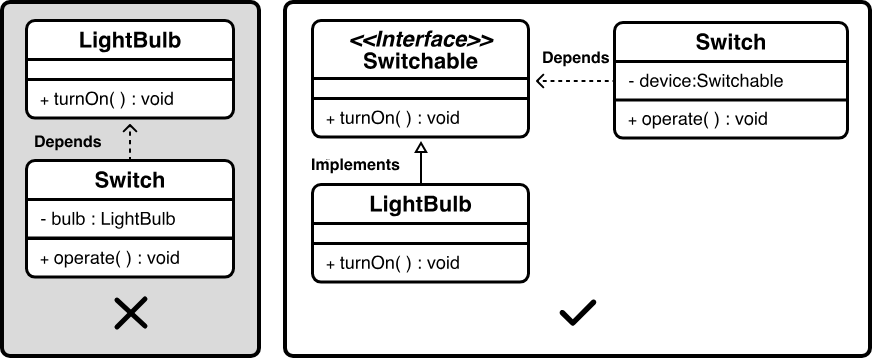
The Dependency Inversion Principle (DIP) states that high-level modules (or classes) should not depend on low-level modules; both should depend on abstractions, such as interfaces. In simpler terms, the principle encourages the use of abstract interfaces to decouple higher-level components from lower-level details.
Violation of DIP#
Here's an example of a design that violates DIP by having a high-level class depend directly on a low-level class:
class LightBulb {
    public void turnOn() {
        System.out.println("LightBulb is on.");
    }

    public void turnOff() {
        System.out.println("LightBulb is off.");
    }
}

class Switch {
    private LightBulb bulb;

    public Switch(LightBulb bulb) {
        this.bulb = bulb;
    }

    public void operate() {
        bulb.turnOn();
    }
}
The Switch class above violates DIP because it depends directly on the low-level LightBulb class, rather than an abstraction. This tight coupling means that changing the LightBulb class, such as modifying its methods, or replacing it with another device, like a Fan, requires altering the Switch class's code. This makes the system less flexible and harder to maintain, as high-level modules should not be tied to low-level details.
Fixing the violation#
To align with DIP, we can refactor this design to use abstractions:
- We introduce a
Switchableinterface that defines standard methods, such asturnOnandturnOff, which any switchable device can implement. - The
Switchclass is modified to depend only on theSwitchableinterface, not on specific devices. - The
LightBulbclass implements theSwitchableinterface, providing itsturnOnandturnOffbehavior.
Now, Switch can work with any device that implements Switchable, like a Fan or a Heater, without needing changes to its code. This design decouples Switch from low-level details, making the system more flexible and easier to extend.
Dependency Inversion Principle (DIP)
Best Practices#
With this decoupled design in place, here are guidelines to ensure DIP compliance:
- Introduce interfaces or abstract classes to represent dependencies, allowing high-level modules to depend on these abstractions.
- Use dependency injection to inject concrete implementations into high-level modules through their abstractions. This promotes loose coupling.
Wrap Up#
This chapter has helped you understand how to use Encapsulation, Abstraction, Inheritance, Polymorphism, and the SOLID principles. These concepts form the backbone of robust software design, enabling you to create flexible, maintainable, and scalable systems. Applying these tools will help you articulate clear design decisions, justify your approach, and demonstrate adherence to industry-standard practices.
To further refine your skills and deepen your expertise, explore the following resources:
- Clean Code: A Handbook of Agile Software Craftsmanship by Robert C. Martin
- Design Patterns: Elements of Reusable Object-Oriented Software by Erich Gamma, Richard Helm, Ralph Johnson, and John Vlissides
- Tidy First?: A Personal Exercise in Empirical Software Design by Kent Beck